
Your blender suddenly stopped working mid-smoothie, leaving you with chunky ingredients and a silent motor. Whether you’re facing complete power failure, blades that won’t spin, or mysterious grinding sounds, this guide walks you through every possible fix. You’ll learn to diagnose problems quickly, perform safe repairs, and prevent future issues—all without professional help in most cases. When your blender not working situation strikes, these proven troubleshooting steps will get you back to blending in no time.
Complete Power Failure Diagnosis
Wall Outlet and Power Cord Testing
Start with the simplest checks first. Plug a phone charger or lamp into the same outlet your blender uses. If nothing powers on, you’ve found your problem—the outlet needs attention, not your blender.
For the cord inspection, run your fingers along its entire length feeling for cuts, severe kinks, or areas where the outer rubber feels hot or melted. Check both prongs on the plug for black burn marks or green corrosion. A loose-fitting plug in the outlet also indicates the plug prongs may be worn.
Critical warning: Never use a blender with visible cord damage—this creates serious electrical shock and fire hazards. Replace damaged cords immediately.
Internal Fuse Replacement Guide
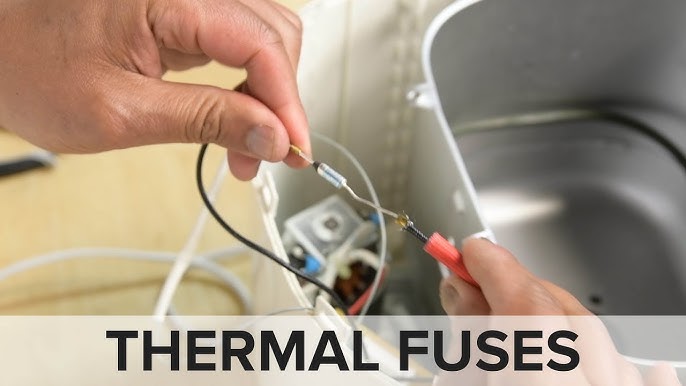
When your blender shows zero signs of life, the in-line fuse is often the culprit. This safety component cuts all power when electrical overload occurs.
Finding the fuse:
– Unplug the blender and flip it upside down
– Remove the base cover screws (usually 4-6 screws)
– Look for a small cylindrical glass or ceramic tube about 1 inch long
– The fuse sits in a wire connecting your speed switch to the motor
Testing procedure:
– Set your multimeter to continuity mode (beep symbol)
– Touch probes to both fuse ends—no beep means it’s blown
– Replace only with identical amperage rating (printed on fuse end)
– Never bypass the fuse—it’s protecting you from electrical fires
Switch and Terminal Issues
Liquid infiltration is the #1 cause of switch failure. If your blender smells like old smoothies near the buttons, corrosion has likely set in. You’ll need professional service unless you’re comfortable with electronics repair. Check for loose terminal connections inside the base—vibration can gradually disconnect these spade connectors. If you notice intermittent power where the blender works on some speed settings but not others, this points directly to switch problems rather than complete electrical failure.
Motor Overheating Solutions
Immediate Recovery Steps
Your blender’s thermal protection just saved your motor from melting. Here’s what to do:
Cooling protocol:
– Unplug immediately—don’t keep trying
– Wait 30 minutes minimum (longer for heavy-duty motors)
– Use this time to remove the jar and check for vent blockages
– Clean any debris from cooling vents with compressed air
Common overheating triggers:
– Blending frozen fruit without enough liquid
– Running longer than 60 seconds continuously
– Placing blender against a wall restricting airflow
– Ambient temperature above 85°F in your kitchen
Prevention Strategies
Implement the “1-minute rule”: blend for 60 seconds, rest for 60 seconds. For thick mixtures like nut butter, rest for 2-3 minutes between cycles. Always add liquid first—use 1 cup liquid for every 2 cups frozen ingredients.
Position your blender with 6 inches of space on all sides. Those cooling vents on the bottom draw air through the motor; blocking them is like putting a plastic bag over your car’s radiator. Regularly clean vents with compressed air to prevent dust buildup that insulates heat.
Blade Assembly Non-Rotation Fixes
Clearing Physical Obstructions
When your motor runs but blades stay still, something mechanical is blocking rotation.
Jammed blade clearing:
1. Power off and unplug—never reach into a powered blender
2. Remove the jar and flip it upside down
3. Try rotating the blade assembly manually using a wooden spoon handle
4. For frozen blockages, run warm water over the jar base for 2-3 minutes
5. Disassemble completely for thorough cleaning if debris is visible
Hidden obstructions to check:
– Dried food under the blade assembly
– A small piece of utensil that broke off
– Jar lid gaskets that slipped into the blade path
Drive System Mechanical Repairs
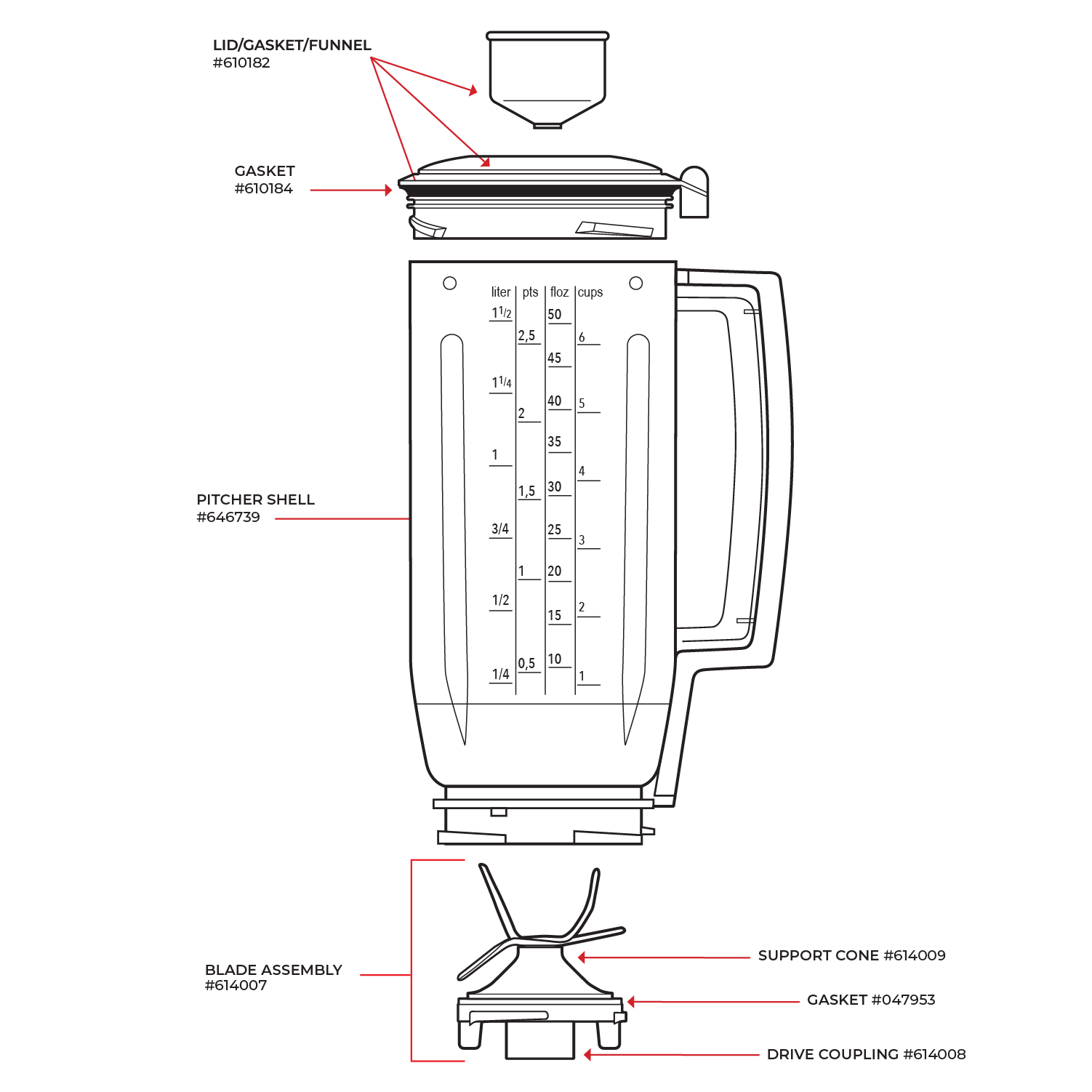
Drive stud diagnosis:
The metal shaft connecting motor to blades often loosens over time. With the jar removed, wiggle the drive stud (the metal piece sticking up from the base). Any movement indicates the mounting nut needs tightening—a 10mm wrench usually fits.
Coupling replacement indicators:
– Black plastic shavings under the jar
– Blades spin with no load but stop under ingredients
– Rhythmic clicking sounds during operation
– Visible wear on coupling teeth (should be sharp, not rounded)
Most couplings twist off counterclockwise. Replacement parts cost $5-15 and restore full power transmission.
Abnormal Operation Sounds
Grinding Noise Investigation
Grinding sounds scream “stop immediately”—continued use destroys expensive components.
Quick diagnosis process:
1. Remove jar and run motor briefly—if still grinding, motor bearings are failing
2. With jar removed, manually spin the blade assembly—rough rotation indicates bearing replacement needed
3. Check drive coupling for missing teeth or chunks
4. Wiggle motor shaft—excessive play means professional service required
Burning Odor Response
Any burning smell demands immediate shutdown and investigation. Different odors indicate different problems:
- Electrical burning (sharp, acrid): Power off immediately, check cord and switch
- Mechanical burning (rubbery, oily): Usually drive coupling or bearing failure
- Food burning (toasty, nutty): Ingredients stuck under blades overheating
Never continue operation with burning smells—risk of fire or permanent motor damage is real.
Preventive Maintenance Schedule
Daily Habits That Prevent Problems
Post-use routine:
– Rinse jar immediately—dried food is your enemy
– Remove blade assembly for thorough cleaning
– Wipe motor base with damp cloth (never submerge)
– Check cord for damage before storing
Weekly inspection checklist:
– Test all speed settings briefly
– Clean cooling vents with compressed air
– Inspect drive coupling for wear
– Check jar for cracks around the base
Monthly Deep Maintenance
Take 20 minutes monthly to prevent 90% of failures:
– Disassemble blade assembly completely
– Clean gasket grooves with a toothbrush
– Lubricate appropriate parts per manufacturer guidelines
– Check internal jar bottom for wear patterns
Storage best practices:
– Store with jar removed to prevent gasket compression
– Keep away from heat sources like ovens
– Ensure complete drying before storage to prevent mold
Component Replacement Guidelines

When to Replace vs. Repair
Replace immediately:
– Power cord with any exposed wire
– Cracked jar (especially near blade assembly)
– Blade assembly with bent or nicked blades
– Drive coupling with 25%+ tooth wear
Professional service required for:
– Motor bearing replacement
– Switch repair
– Internal wiring issues
– Warranty-covered repairs
Testing Before Replacement
Use this sequence to avoid unnecessary parts purchases:
- Power test: Verify outlet works with another appliance
- Cord test: Wiggle cord while plugged in—intermittent power indicates cord failure
- Fuse test: Check continuity across the in-line fuse
- Switch test: Use multimeter to verify power reaches motor
- Motor test: Check resistance across motor terminals (10-50 ohms typical)
Emergency Troubleshooting Quick Reference
No power at all:
– Check outlet → inspect cord → test/replace fuse → check switch
Motor runs, blades don’t:
– Remove jar → check coupling → inspect drive stud → test blade rotation
Overheating shutdown:
– Stop immediately → clean vents → wait 30 minutes → reduce load
Grinding sounds:
– Stop immediately → check coupling → test blade bearings → inspect motor
Burning smell:
– Stop immediately → unplug → identify source → professional service if electrical
Final Pro Tips
Keep a small parts kit handy: extra coupling, replacement fuse, and small screwdriver set solve 80% of common issues. When buying replacement parts, always match exact model numbers—blender components are not universal.
Remember: your blender’s thermal protection is a feature, not a flaw. If it shuts down from overheating, it’s saving you from buying a new motor. Understanding why your blender not working situation occurred helps prevent repeat failures—most problems stem from simple maintenance oversights rather than catastrophic failures. With these troubleshooting techniques in your toolkit, you’ll extend your blender’s lifespan significantly while avoiding unnecessary replacement costs.